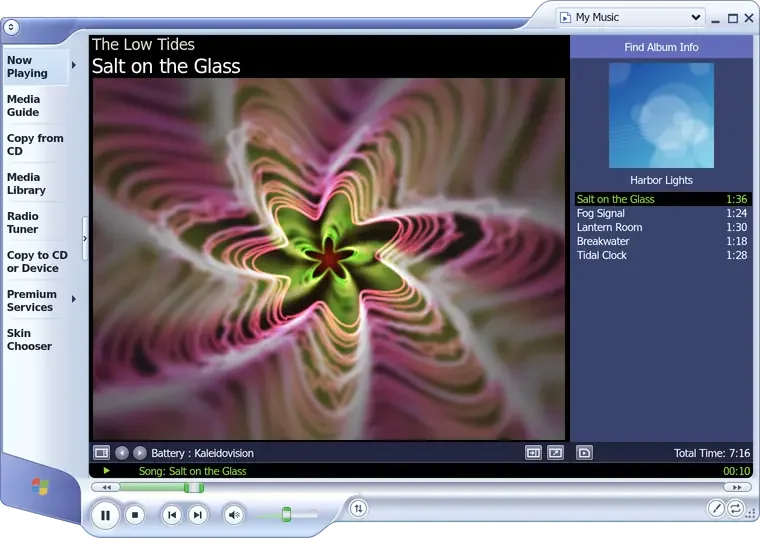
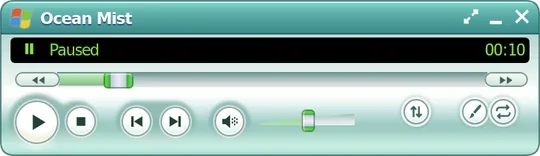
ocean mist is a music player for linux that looks like windows media player 9, the one microsoft released for windows xp in 2003: the sculpted blue frame, the green line of status under the picture, and visualizations you can leave running for a whole album. it plays your own files, internet radio and youtube music, and the songs of your apple music and spotify libraries. this is what it is, how it is put together, and what it took to make a player of 2003 hold a streaming service of 2026.
every picture here is the player itself, drawn by its own page, playing sample music made for them, with invented names
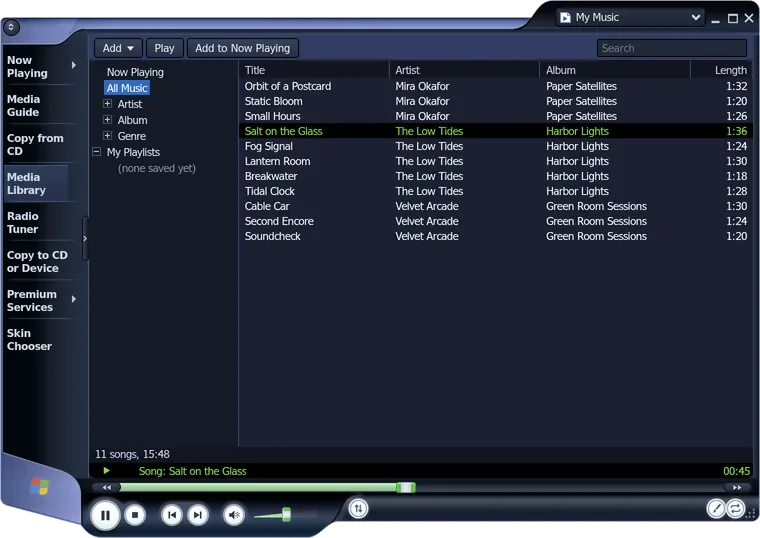
the task bar: now playing, the media library, the radio tuner, premium services, the skin chooser
the visualization, and its name. the arrows beside it step through the others
the album's cover and the list that is playing
the status line, in the green of the original
which list plays: my music, or the one of a streaming service
ocean mist playing, at the size it opens at, with kaleidovision. the round buttons at its foot are play, stop, the song before and after, and the volume.
a window that is a web page
the window has no frame of its own. the player inside it is a page, and the page draws everything, the frame included.
the window ocean mist opens is a gtk window with no title bar, no borders and a clear background. it holds one thing, a webkitgtk view, and the view shows a page kept on your own computer. that page draws the player whole: the frame is an svg drawn to fit whatever size the window is, the buttons are html, and the visualizations are drawn on a canvas, sixty times a second. where the page draws nothing, the window is clear, so the lobes of the frame stand against your desktop the way the original's did. the task bar on the left, the drop-down at the top right and the round buttons at the foot are all the page's.
behind the page is player.py. it owns the window and runs a small web server on 127.0.0.1, which hands the page its files, your songs, the radio streams and whatever the streaming services send. the server answers only its own address and a token made new each time it starts, and the page runs under a content security policy that lets it load scripts and ask for things from its own address and nowhere else. nothing is served outside your computer. the python side uses nothing but its standard library, which is why there is nothing to install beyond gtk, webkitgtk and gstreamer, and nothing to build.
the parts of ocean mist, and what each one asks of another
from
to
how
the page
player
http
player
library
player
ytmusic
player
apple
player
spotify
library
tags
ytmusic
firefox
apple
firefox
spotify
firefox
player
engine
songs
apple
engine
library
each box but the page is a python file of that name. the page asks player.py for everything, over http. library.py keeps the lists, the library and the settings, and tags.py reads titles, covers and lengths out of six kinds of file. the three services read their sign-ins from firefox through firefox.py. the playback engine, whose two edges are drawn in colour, plays apple music's and spotify's songs, and reads apple music's library while it runs. radio.py and mpris.py, the radio and the media keys, are left out.
where its 13,523 lines are
part
lines
the page
3,983
the services and the sign-ins
3,779
the host, the lists and the tags
3,264
the playback engine
2,302
the debian package
195
python, javascript, css, html and shell, counted on 25 october 2026. the page is javascript for the most part: the frame, the controls, the visualizations, the equalizer and premium services. the tag reader is 540 lines and reads mp3, flac, ogg vorbis, opus, m4a and wav without a library.
visualizations you can watch for a whole album
eight of them, drawn from what the music is doing at that moment, in the three groups the original had.
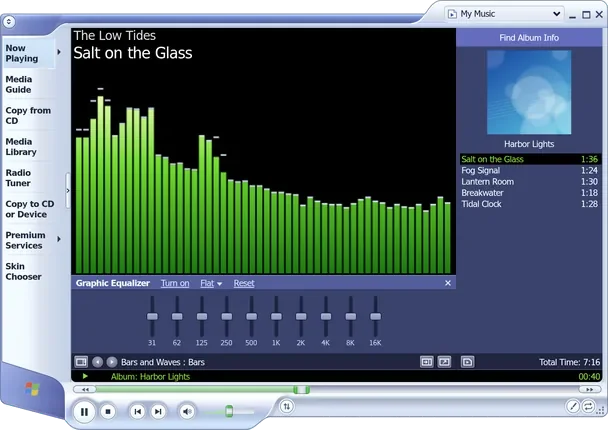
the page plays a song through the browser's own sound graph. on its way to the speakers the sound passes ten filters, which are the equalizer, and an analyser, which measures it 2,048 samples at a time and says how loud each band of pitch is and what shape the wave has. the visualizations read the analyser once a frame. battery has five that leave trails behind them, each frame drawn over the last, faded: randomization, kaleidovision, spider's last moment, event horizon and sepiaswirl. bars and waves has the spectrum as bars with falling peaks, and the wave itself as a scope. ambience has water, soft lights drifting in the dark. or the album's cover, in place of all of them.
a kaleidovision, b event horizon, c bars and d water, two seconds of each, eight pictures a second, all playing one sample song. the player draws them at sixty.
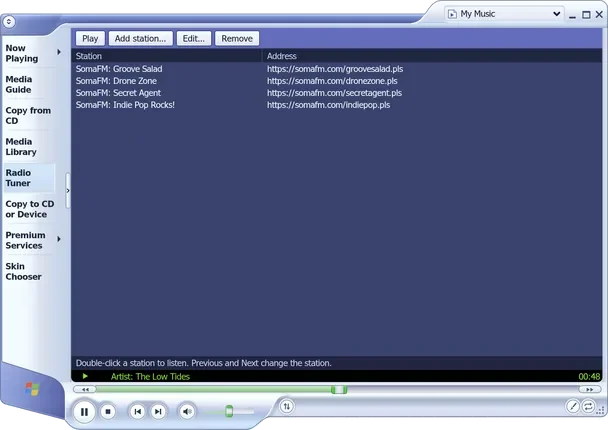
the equalizer is ten bands, from 31 hz to 16 khz, each up or down by as much as 12 db, with eleven presets and the curve you set yourself. the lowest band is a shelf, the highest another, and the eight between them are peaks. a band pushed up would make a loud song clip, so the whole signal steps back a little as the bands rise. the radio tuner plays internet stations from an address or a playlist link, and puts the song's title in the status line when the station sends one. it comes with four stations of somafm.
a the equalizer, under the barsb the radio tunertwo more of the task bar's places. the media library is in the next picture.
skins and colours
the dark skin is the same frame, turned inside out, and every colour is the blue one, turned round the wheel.
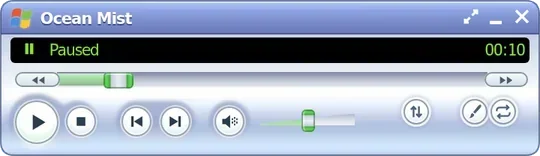
the skin chooser has three skins. classic is the blue the player starts with. dark gives the lists and menus dark surfaces, and darkens the frame without drawing it again: the svg is inverted and then turned half way round the colour wheel, which makes its light parts dark and gives every colour back its own hue. compact shrinks the player to a bar with the status line and the controls, and keeps whichever of the other two you had.
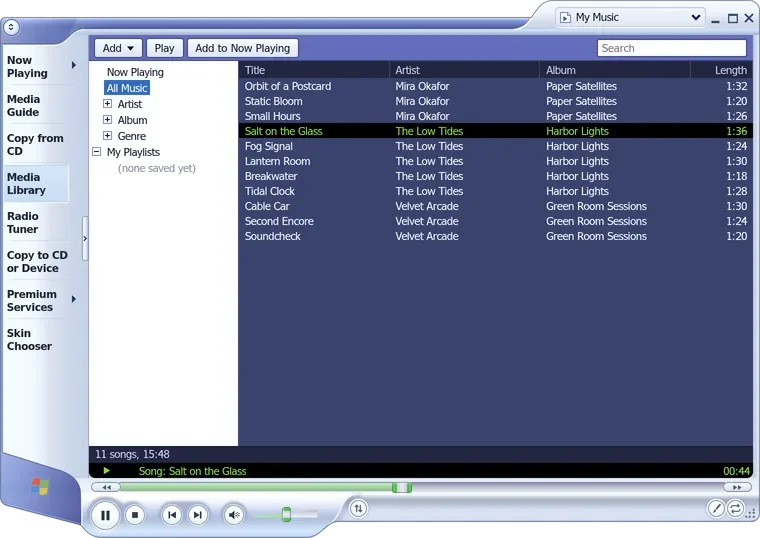
the media library, in the classic skin and the dark one. drag the line between them. it reads your music folder, and any other you add, by artist, album or genre, and leaves the files where they are.
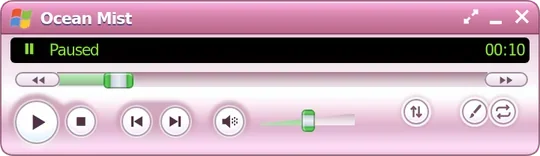
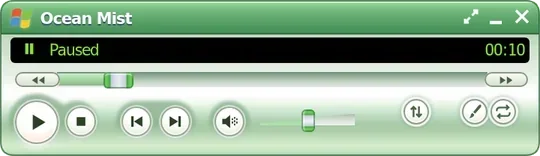
the colours are one rule in the stylesheet. every part of the frame that should change colour has a class, and with a colour chosen, that class turns it round the colour wheel by so many degrees: purple is 40, pink 90, red 130, orange 165, green 250 and teal 300. nothing is drawn twice, and a new colour is one more number.
compact mode in four of its seven colours. the green of the status line and of the seek bar stays put: it is not on the wheel.
three services, two roads
youtube music's songs come into the player itself. apple music's and spotify's are protected, so the player goes to them instead.
none of the three has a published api a player like this one could use. so ocean mist does what their own websites do, and the user signs in where they already have: in firefox, on the service's own page. ocean mist has no sign-in form and never sees a password. it reads the service's cookies from the firefox profile you choose, read-only and straight into memory, only when a request needs them, and never writes them to disk. signing out in ocean mist only stops it using them.
youtube music takes the short road. ytmusic.py makes the requests the youtube music apps make, for searches, albums, artists, playlists and similar songs, and then for the song itself. its sound arrives as aac, in pieces a few seconds long. the python side packs each piece again as mp4, and the page plays the pieces through the browser's media source, so no code of youtube's runs, and the songs go through the equalizer and the visualizations like your own files. searching and playing need no account. a sign-in adds your playlists, your liked music and the means to like and add songs, and searches and songs are still asked for anonymously, so they stay out of your youtube history.
apple music and spotify take the long one. their sound is protected by DRM, and only a browser with google's widevine module can play it. so ocean mist plays them in their own web players, in a playback engine: castlabs's build of electron, a chromium that can load widevine, which you download once, after a screen that says what it is, how big it is and whose licences come with it. the engine opens the service's web player in a window that is never shown, signed in with the same cookies, and ocean mist's buttons drive it: play, pause, seek, the volume, the song before and after. it ends a minute after the music stops. nothing is unlocked or recorded: the song is played the way a browser tab plays it, and the engine refuses to go to any address but the service's own.
what each source of music gets
source
needs an account
the equalizer
the visualizations
played by the page
your files
no
yes
yes
yes
youtube music
no to search and play
yes
yes
yes
apple music
yes a subscription
no
yes from the engine
no
spotify
yes premium
no
yes from the engine
no
the visualizations follow apple's and spotify's songs anyway. the engine has a second page of its own, with no window, that takes in the service page's sound the way chromium shares a tab's sound, and hands the player how loud each band is, about thirty times a second. it opens no recording on the system, so the desktop's microphone light stays off, and the sound itself is never kept or sent. the equalizer cannot follow them: the sound never passes through the player, so there is nothing for its filters to change.
your libraries come in the same way. a view of the service's web page with no window, signed in, reads them with read-only requests: apple music's recently added, playlists, albums, artists and songs, and spotify's liked songs, playlists, albums and artists. before the page loads, every request that would sign you out is blocked, since a sign-out there would sign you out of firefox too. nothing in your account is changed, and ocean mist has no way to change it.
the engine needs one more thing on ubuntu 24.04 and later. chromium keeps the service's page in a sandbox built of user namespaces, and ubuntu gives those only to programs an apparmor profile names. the debian package installs a profile that names the engine's file and gives it that one permission, and nothing else. the first release's profile had one line more, which named a variable ubuntu 24.04 never declares, so its parser refused the profile and the sandbox never loaded there. building the package on that version found it, and 0.1.1 took the line out.
keeping it small
a player that sits in a corner all day should not hold a gigabyte. most of what it holds is what it stands on.
memory of all the player's processes, in megabytes
while
0.2.0
0.3.0
open, nothing playing
286
250
one of your songs playing
332
279
a youtube music song
378
323
an apple music song
871
691
the same, its library read
1,055
695
a spotify song
1,215
732
the highest each state reached, with a visualization on, on ubuntu 26.04, both versions measured in one session. the measure is PSS, which shares out among processes what they have in common.
an empty webkit window takes 160 to 170 mb on the same system, before there is a player in it, and the engine takes 430 to 470 mb of its own while a song plays, a hundred of them widevine's. what 0.3.0 took out was everything else that did not change what you see or hear:
webkit paints the page with the processor and lets the graphics card only put it together. the visualizations keep their sixty frames a second, in the window and in full screen, without the 35 mb the card's own painting held.
the sound graph rests while nothing plays, and what the player frees goes back to the system once a minute.
the engine runs chromium in its mode for small devices, and since its window is never shown, the service's page in it is never drawn either. it gets no fonts, nothing from the analytics and tracking sites the services' pages call, and not spotify's looping video behind the song.
while the engine is up for apple music, apple music's library is read in the engine's page, and the library's own view closes: apple's player is not open twice. that is the drop from 1,055 to 695.
the library views share one network process for as long as the player runs. before, every view that closed left its own behind, some 20 mb each time.
eleven days, four releases
the player came into its repository whole. everything about the streaming services was done there, in public, an issue at a time.
every change to ocean mist goes the same way: an issue that says what and why, a branch named after it, and a pull request that closes it, in one of four milestones, the foundation, the classic player, the streaming services and the releases. that is 37 issues and 38 merged pull requests so far.
the repository opens with the player imported whole, under the gpl. youtube music's search and songs come in the same day its own list in now playing, kept apart from your files
signing in to youtube music through firefox
apple music's library, then its songs through the playback engine, then the debian package. 0.1.0 is released
the engine's apparmor profile mended for ubuntu 24.04
0.1.1 with the profile, then 0.2.0: spotify, visualizations that follow the engine's songs, a list for each service spotify alone took 31 commits, many of them about a song that stalls, or ends itself, while its page sets it up
0.3.0, with less memory in every state
the dark skin, and menus for the type and its size
a security review a song whose file name held a quotation mark could end an attribute early in the media library and add one of its own, a script among them. the page now escapes it, runs under a content security policy, and its server answers no other host
what it does not do yet
it is young, and some of what the original had is a note in its place.
the media guide, copy from cd and copy to cd or device are in the task bar because the original had them. each opens a short note.
there is no gapless playback between songs, and an apple music or spotify song leaves a gap of a few seconds, since each is loaded when its turn comes.
apple music and spotify are read-only, and their search is of your own library, not of the whole service. spotify's is of the first 1,000 of each list, read whole, since its page has no search of a library.
now and then spotify's own page moves on to another track a second and a half into a song, which the player takes for the song's end. it was seen only after hundreds of plays on one account, and it is not solved.
it has been built and checked on ubuntu 26.04 only, with gnome on wayland. there is no apt repository, no flatpak and no snap: a new release is a new package to download.
trying it
on ubuntu 24.04 or later, or debian 13 or later, download ocean-mist_0.3.0_all.deb from the latest release, and install it from the folder you saved it to. apt brings what it needs:
sudo apt install ./ocean-mist_0.3.0_all.deb
on any other distribution, with python 3, pygobject, gtk 3, webkitgtk 4.1 and gstreamer installed, run it from a copy of the repository. give it a song, a folder or a playlist, and it starts there:
git clone https://github.com/NahuelGenchi/ocean-mist.git
cd ocean-mist
python3 player.py ~/Music
your music files are only ever read. your settings live in ~/.config/ocean-mist/state.json, and nothing of youtube music, apple music or spotify is kept on disk, unless you save a playlist.